Crafting with Wedding Love Dingbats: A Hand-Drawn Font for Makers and Small Shops
Last week, I was testing a new candle label design for my shop’s Valentine’s collection. I had the perfect hand-lettered script for the fragrance name, but the sides of the label felt empty. I opened my font manager, scrolled to Wedding Love Dingbats, and typed a few lowercase letters. Out came delicate hearts, intertwined rings, and tiny floral sprays. Suddenly the label felt complete—romantic, balanced, and ready for gift-giving. That moment reminded me how much a well-crafted dingbats font can elevate a simple product into something memorable.
What Makes Wedding Love Dingbats Stand Out
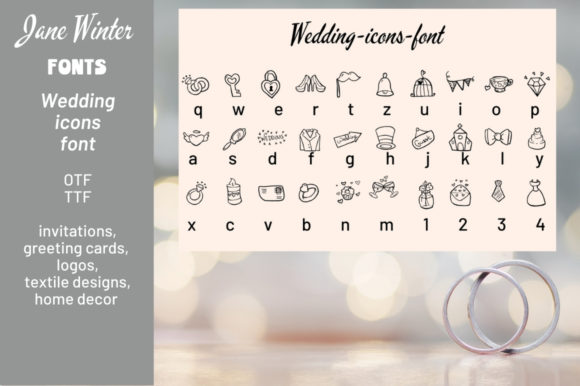
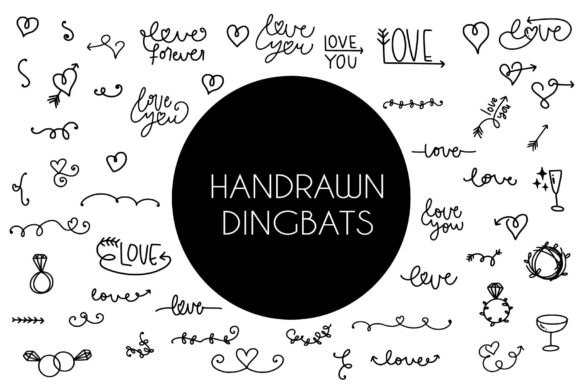
This is not your average set of random symbols. Wedding Love Dingbats is a hand-drawn dingbats font built around romance, elegance, and subtle whimsy. Every character feels organic—slightly imperfect strokes that mimic real pen and ink. The collection includes classic wedding motifs: bouquets, bells, birds, rings, hearts in various sizes, lacy borders, and decorative flourishes. Because it’s a true dingbats font, each key on your keyboard maps to a unique icon. You can type entire borders, corner accents, or even small word substitutes by switching to this font in your design software.
For makers like us, this means instant access to dozens of cohesive illustrations without opening a vector program. The mood is intimate and slightly vintage, yet clean enough for modern stationery. It whispers “handcrafted” without shouting.
Real Products That Come Alive with These Dingbats
I’ve used Wedding Love Dingbats across almost every category in my shop, and each time it adds that special touch buyers notice. Here are a few examples that work especially well:
Candle and Wax Melt Labels
Small labels need quick visual impact. Instead of adding a heavy graphic, I place a tiny floral dingbat next to the scent name—rose for “French Lavender,” a sprig for “Eucalyptus.” It creates an elegant, minimalist look that feels curated. Because the dingbats are all the same line weight, they integrate seamlessly with most script and sans serif fonts.
Wedding Invitation Suites
This is where the font truly shines. I design invitation sets for local couples, and Wedding Love Dingbats gives me a library of ceremony-ready ornaments. I use the ring icon on the RSVP card, a small bird on the details insert, and a border of alternating hearts and florals around the main text block. The hand-drawn quality makes the suite feel personal, not clip-art-like.
Boutique Gift Tags and Packaging
Gift tags are tiny canvases. I print them onto kraft cardstock with a short message in a clean serif font, then add a single dingbat above the text. For wedding favors, the bridal couple symbol works perfectly. For everyday orders, I use a simple heart. It ties my brand packaging together and makes customers feel the extra care.
Printable Wall Art and Signs
Large-scale prints benefit from decorative dividers and corner accents. I lay out a quote in a modern serif, then frame it with a row of Wedding Love Dingbats ornaments across the top and bottom. The consistent hand-drawn style keeps the whole piece cohesive. For farmhouse-style signs, I combine a distressed script with a single large bell or floral cluster from the font.
Mugs, Totes, and Apparel
Heat transfer vinyl and sublimation both work well with dingbats. I’ve added the heart-and-ring glyph to a tote bag paired with a simple script “Love” – it becomes a gift-ready design in seconds. For mugs, a small row of alternating flowers and hearts along the rim creates a sweet detail that doesn’t overpower the main message.
Readability and Cutting Machine Advice
When you’re producing physical products, font clarity matters. Wedding Love Dingbats has been drawn with clean, open shapes, which translates well to vinyl cutting and screen printing. For small stickers (under 1.5 inches), stick to the simpler glyphs like solid hearts or rings. Intricate florals and birds work best at larger sizes—think 2 inches and up. I always test a print or cut sample before committing to a production run.
- Vinyl cutting: Adjust your blade depth and pressure; the thin strokes need a steady setting. Weed slowly around delicate parts.
- Printable stickers: Use matte paper for a hand-drawn look. The font’s slight texture blends beautifully with a matte finish.
- Heat transfer: Mirror the design and use a low-tack carrier sheet so the fine details lift cleanly.
Pairing Wedding Love Dingbats with Other Fonts
Because this is a decorative dingbats font, it works best as an accent rather than the main text. I pair it with:
- Clean sans serif like Montserrat or Lato for a modern, crisp contrast.
- Soft script like Great Vibes or Beth Ellen for romantic, flowy combinations.
- Simple serif like Playfair Display for editorial, elegant layouts.
- Bold display for contrasting sizes in signage and posters.
The key is to let the dingbats breathe. Avoid stacking four different decorative elements; one well-placed icon can speak louder than a cluster.
Production and Licensing Considerations
Before selling any products featuring Wedding Love Dingbats, double-check the font’s license file. Most quality dingbats fonts come with a standard desktop license that allows commercial use for physical products you design (stickers, cards, apparel, etc.). If you plan to offer digital templates, editable printables, or logo designs that incorporate the font, you may need an extended license. The same applies to SVGs created from the glyphs—only use them for commercial sales if your license explicitly covers that.
File formats usually include OTF and TTF, which work across Windows and Mac, as well as in most design apps (Adobe Illustrator, Procreate, Cricut Design Space, Silhouette Studio). I always install the OTF version for better typographic controls. Because it’s a dingbats font, there are no ligatures or stylistic alternates—it’s a straightforward one-character-per-glyph system. But that simplicity is part of its charm.
Tips for Mockups and Listing Images
When photographing or mockupping your products, use the dingbats as a styling prop. I often print a small sheet of Wedding Love Dingbats motifs and place them next to candles or cards in flat lays. They add a handmade accent that helps shoppers imagine the final product. For digital mockups, I enlarge a single flower glyph and set it behind the main text at low opacity—it creates a watermark-like feel that looks sophisticated.
In listing images, avoid using the dingbats as the primary focus unless you’re selling the ornament itself. Let the product take center stage, and use the font to support the aesthetic. A small ring icon near the price or a heart next to the title can guide the eye without distracting.
Seasonal and Year-Round Uses
While the name suggests weddings, Wedding Love Dingbats works beautifully for engagement parties, anniversaries, bridal showers, Valentine’s Day, and even Mother’s Day. Many glyphs like flowers, birds, and hearts transcend weddings entirely. I’ve used the floral borders on birthday invitations and the simple heart on everyday greeting cards. It’s a versatile asset for any shop that touches love-themed or romance-related niches.
For fall and winter products, I combine the wreath glyph with seasonal clipart (pumpkins, snowflakes) from other fonts. The hand-drawn line weight matches well with similarly styled vector sets, so you can mix and match without clashing.
If you design planner stickers or journal kits, the smaller dingbats work perfectly as bullet points, accent icons, or habit trackers. A row of tiny hearts across the top of a weekly spread adds a gentle decorative element without overwhelming the layout.
Final Design Workflow Suggestion
Whenever I start a new product, I open a blank canvas and type out a few rows of Wedding Love Dingbats in different point sizes. This gives me a visual library of what’s available. I then pick three to five glyphs that match the product’s mood. I used to browse through each character on the keyboard, but now I keep a printed cheat sheet taped above my desk. It saves minutes every project.
If you work in Cricut Design Space, note that you may need to use the “System Font” option to see the dingbats correctly. The font will appear alphabetically, so typing a single letter (like “a” or “b”) will produce the corresponding icon. Create a small key chart for yourself—it’s worth the few minutes.
A dingbats font like Wedding Love Dingbats might seem like a niche tool, but in the hands of a creative maker, it becomes a versatile bridge between text and illustration. It saves time on sourcing individual graphics, maintains a consistent aesthetic across product lines, and adds that hand-drawn authenticity buyers crave. Whether you’re labeling candles, designing invitation suites, or prepping a mug collection, this font deserves a permanent spot in your creative toolkit.